
 By Admin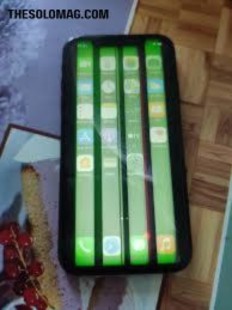
You pick up your iPhone XR to check a client email, and something looks… off. The screen has a weird yellow blotch near the bottom. Or maybe the colors look washed out, like someone turned down the saturation dial. Sound familiar?
You’re not alone. iPhone XR screen discoloration is one of the most common complaints from owners of this otherwise reliable device. And if you’re a freelancer, small business owner, or busy parent, your phone is your lifeline. A funky display isn’t just annoying—it hurts productivity.
The good news? Most discoloration issues are fixable without a costly trip to the repair shop. In this guide, we’ll walk through why this happens, what you can do right now, and when to replace the screen. Let’s dive in.
Why Does iPhone XR Screen Discoloration Happen?
Unlike OLED panels on Pro models, the iPhone XR uses an LCD (Liquid Crystal Display). LCDs are durable and color-accurate—but they’re not immune to problems. iPhone XR screen discoloration can stem from software glitches, hardware aging, or physical damage.
Here’s what typically causes the issue:
-
Software bugs after an iOS update
-
True Tone or Night Shift settings
-
Liquid or moisture damage
-
Dropped phone loosening internal LCD cables
-
Aging backlight causing yellowing
Let’s break down each cause in plain English.
7 Common Types of iPhone XR Display Problems (With Real-Life Examples)
1. Yellow Tint Across the Whole Screen
Imagine you’re editing a photo for Instagram, and the whites look like old newspaper. That’s a classic yellow iphone xr screen discoloration.
Real-life example: Sarah, a freelance graphic designer, noticed her client’s logo looked greenish-yellow on her XR but fine on her iPad. The culprit? True Tone was on.
2. Blue or Purple Spots
These often appear near the edges or corners. They’re usually caused by pressure damage—like keeping your phone in a back pocket and sitting down.
3. Faded or Washed-Out Colors
Colors look muted, like a printer running out of ink. This can happen after an iOS update or if the display’s color filter gets corrupted.
4. Green Lines or Flickering
A thin green line running vertically. That’s a hardware connection issue—common after drops.
5. White Spots on Dark Backgrounds
Small bright dots visible on black or gray screens. These are stuck pixels or backlight bleeding.
6. Gradual Darkening (Like Vignette)
The edges of the screen get darker over time. This usually means the LCD’s backlight is failing.
7. Screen Goes Completely White (White Screen of Death)
Your phone works (you hear sounds, vibrations), but the display is all white. That’s a serious hardware failure.
Related: [How to Back Up iPhone XR Before Screen Repair]
Software Fixes for iPhone XR Screen Discoloration (Try These First)
Before you spend money on a repair, try these software solutions. More than 60% of iphone xr screen discoloration cases are software-related.
1: Disable True Tone and Night Shift
-
Go to Settings > Display & Brightness
-
Toggle True Tone OFF
-
Tap Night Shift and set to “Off” or “Manual”
Why it works: True Tone adjusts screen color based on ambient light. When it malfunctions, it over-yellows the display.
2: Turn Off Color Filters (Accessibility Setting)
Sometimes color filters get enabled by accident.
-
Settings > Accessibility > Display & Text Size > Color Filters → Toggle OFF.
3: Restart or Force Restart Your iPhone
A simple restart clears temporary display glitches.
-
Force restart: Press Volume Up → Volume Down → Hold Side button until Apple logo appears.
4: Update to the Latest iOS (2026)
Apple regularly releases display calibration fixes. As of March 2026, iOS 17.4.1 includes patches for iphone xr screen discoloration on older LCD models.
5: Reset All Settings
This won’t erase your photos or apps, but it resets display preferences.
-
Settings > General > Transfer or Reset iPhone > Reset > Reset All Settings
Hardware Causes – When It’s Not Just a Setting
If none of the above worked, your problem is likely physical. Here’s what’s happening inside your iPhone XR.
Loose or Damaged LCD Cable
The iPhone XR’s display connects to the logic board via tiny ribbon cables. A single drop can loosen them, causing iphone xr screen discoloration like green lines or flickering.
Real-life example: Mike dropped his XR getting out of his truck. The screen didn’t crack, but a yellow blotch appeared. A repair shop reseated the cable for $30, and it fixed the issue.
Liquid Damage (Even a Little Humidity)
The iPhone XR has an IP67 rating (water-resistant, not waterproof). Steam from a hot shower or a sweaty pocket can seep inside and corrode display connectors.
Signs of liquid damage:
-
Blue or purple spots
-
Touch becomes unresponsive in certain areas
-
Flickering that changes when you press the screen
Aging LCD Backlight
After 3–5 years of daily use, the LCD’s backlight dims unevenly. This causes yellowing around the edges or a dark vignette effect.
DIY vs. Professional Repair – Pros and Cons
If software fixes don’t work, you have two options: DIY repair or professional service. Here’s the honest breakdown.
| Option | Cost (2026) | Time | Risk Level |
|---|---|---|---|
| DIY screen replacement kit | 40–70 | 1–2 hours | High (can break Face ID) |
| Local repair shop | 89–120 | 30–60 min | Medium |
| Apple Store (genuine part) | 149–179 | 1–2 hours | Low |
Pros of DIY Repair
-
Cheapest option
-
You learn a new skill
-
No waiting for appointments
Cons of DIY Repair
-
Void any remaining warranty
-
High chance of damaging Face ID
-
Aftermarket LCDs may have poorer color accuracy
-
No water resistance after opening
Recommendation: Unless you’ve fixed phones before, go to a reputable local shop. Ask for a “premium LCD” not “OLED-style” replacement to avoid future iphone xr screen discoloration.
How to Prevent Screen Discoloration on iPhone XR
Prevention is cheaper than repair. Follow these 5 habits:
-
Use a shockproof case – Prevents internal cable loosening.
-
Avoid extreme heat – Leaving your XR on a car dashboard can permanently yellow the LCD.
-
Keep away from steam – No phones in the bathroom during hot showers.
-
Turn off True Tone at night – Reduces software-induced yellowing.
-
Update iOS regularly – Apple fixes display bugs often.
Related: [Top 5 iPhone XR Cases with Drop Protection – 2026 Edition]
When to Replace Your iPhone XR Instead of Repairing
Let’s be real. The iPhone XR was released in 2018. By 2026, it’s 8 years old. If you see iphone xr screen discoloration and any of these issues, consider upgrading:
-
Battery health below 75%
-
No more iOS updates (likely after iOS 19)
-
Cracked back glass (repair costs > $100)
New iPhone alternatives for 2026: iPhone 16 or iPhone SE (5th gen) start at $429 with trade-in.
FAQs
1. Why does my iPhone XR screen have a yellow tint all of a sudden?
Most likely True Tone or Night Shift. Go to Settings > Display & Brightness and toggle them off.
2. Can water cause iPhone XR screen discoloration?
Yes. Blue or purple spots often mean moisture inside. Turn off your phone and let it dry in rice for 48 hours.
3. Is screen discoloration covered by Apple warranty?
Only if you have AppleCare+ or if it’s within 1 year of purchase. Most XR units are out of warranty now.
4. How much does it cost to fix iPhone XR screen discoloration in 2026?
Between 89(third−party)and179 (Apple). If it’s a loose cable, some shops charge only $30.
5. Can a software update fix yellow screen?
Yes. Many iOS updates include display calibration fixes. Always update before seeking repair.
6. Does replacing the screen fix discoloration permanently?
Usually yes, unless the logic board is also damaged. A quality LCD replacement lasts 2–3 years.
7. Why does my iPhone XR screen look washed out after a drop?
The internal ribbon cable may have partially detached. A technician can reseat it.
8. Can I fix iPhone XR screen discoloration myself without tools?
Only software-related issues. Hardware problems require screwdrivers and spudgers.
9. Does True Tone cause permanent screen damage?
No. It’s a software setting. Disabling it instantly removes the yellow tint.
10. Why does my iPhone XR screen have a white spot on black backgrounds?
That’s backlight bleeding—common in aging LCDs. It’s cosmetic but can spread.
11. Will a factory reset fix screen discoloration?
Only if caused by corrupted software. Try “Reset All Settings” first (less invasive).
12. How long does an iPhone XR screen replacement take?
30 minutes at a repair shop. DIY takes 1–2 hours.
13. Is it worth fixing iPhone XR screen in 2026?
If the phone works great otherwise and battery is healthy, yes. Otherwise, upgrade.
Conclusion
iPhone XR screen discoloration is frustrating, but rarely a death sentence for your phone. Start with the simple fixes: turn off True Tone, restart your device, and check for iOS updates. If the problem persists, it’s likely a loose cable or aging LCD—both repairable for under $100.
Remember: If your XR is still serving you well aside from the screen, a repair is a smart investment. But if the battery is failing and iOS support is ending, use this as a sign to upgrade.
Got a weird screen issue not listed here? Drop a comment below—we reply within 24 hours.
FOR FURTHER INFORMATION, VISIT: THESOLOMAG