
 By Admin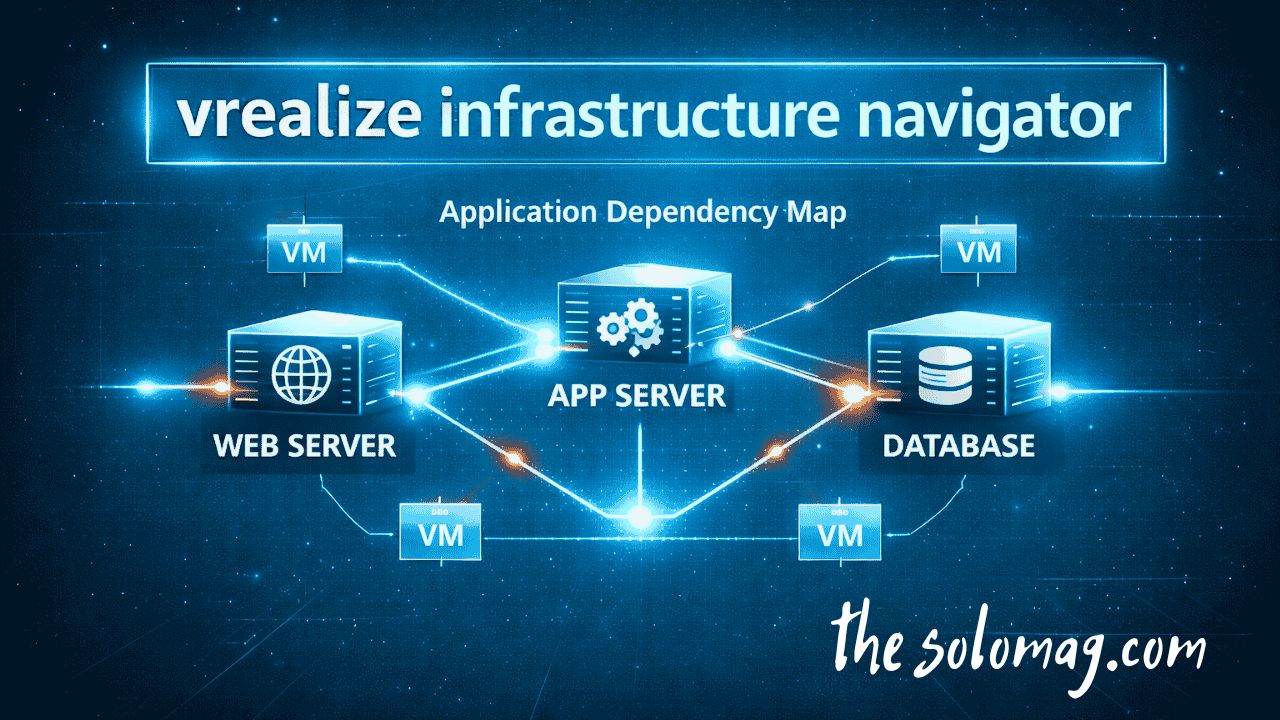
In the complex landscape of modern IT, virtualization has become the standard, but with it comes a significant challenge: visibility. As data centers grow and applications become more distributed, understanding the intricate web of dependencies between virtual machines (VMs) and services is nearly impossible to manage manually. This is where VMware’s vRealize Infrastructure Navigator (VIN) steps in .
vRealize Infrastructure Navigator is an agentless VMware tool designed to automatically discover, map, and visualize application dependencies within your vSphere environment . It acts as a cartographer for your data center, providing IT teams with a real-time, dynamic view of how applications communicate across the virtual infrastructure.
In this guide, we will explore everything you need to know about vRealize Infrastructure Navigator, from its core features and benefits to installation steps and its strategic role in modern IT operations.
What is vRealize Infrastructure Navigator?
vRealize Infrastructure Navigator is a VMware solution that discovers and visualizes application dependencies within vSphere . It integrates directly into the vSphere Web Client, collecting metadata about installed applications and mapping network connections between virtual machines . This creates a live dependency map that shows:
-
Which services are running on which VMs
-
How VMs are communicating with each other
-
The specific protocols and ports being used
-
Critical application dependencies that could impact performance
The tool eliminates the “visibility gap” that exists in many virtualized environments by showing exactly what is connected, how components communicate, and what dependencies exist—all without installing agents or modifying application code
Quick Definition
vRealize Infrastructure Navigator is VMware’s application mapping tool. It doesn’t monitor traffic bandwidth; instead, it identifies and maps which apps are communicating with each other across your virtual machines, providing clarity around application behavior inside your virtual environment .
Why is Application Dependency Mapping Important?
Without proper visibility into application dependencies, infrastructure changes can lead to unexpected and costly outages . Imagine migrating a server to new hardware without realizing it hosts a critical database dependency for a front-end application. The result? Application downtime.
The National Institute of Standards and Technology (NIST) emphasizes configuration visibility as a key cybersecurity control. Dependency mapping supports this by :
-
Identifying communication paths between systems
-
Highlighting critical application tiers
-
Reducing change-related incidents
-
Supporting compliance audits like PCI-DSS and HIPAA
Manual diagrams and spreadsheets quickly become outdated in dynamic virtual environments. vRealize Infrastructure Navigator automates this entire process, ensuring your documentation is always accurate and up-to-date .
Key Features of vRealize Infrastructure Navigator
vRealize Infrastructure Navigator comes packed with features designed to simplify IT operations and enhance visibility.
Automated Application Discovery
VIN scans your vCenter Server environment, leveraging VMware Tools to gather metadata about installed applications and services on each VM. It identifies everything from web servers and databases to custom applications, building a comprehensive inventory without manual intervention .
Visual Dependency Mapping
The tool’s standout feature is its ability to create visual maps of application dependencies. These dynamic diagrams show you exactly which VMs are communicating, what protocols they are using, and the direction of traffic. This is invaluable for understanding complex, multi-tier applications .
Real-time Updates
Unlike static documentation, VIN provides real-time visibility. As your environment changes—new VMs are provisioned, applications are updated, or services are decommissioned—the dependency maps automatically update to reflect the current state .
Agentless Architecture
One of the biggest advantages of VIN is that it requires no additional agents on your guest operating systems. It collects data passively through VMware Tools, meaning you gain deep insights without adding management overhead or impacting VM performance .
Application Grouping
VIN allows you to group interconnected VMs into logical applications. This provides a service-centric view of your infrastructure, making it easier to manage, monitor, and troubleshoot entire application stacks rather than individual components .
vSphere Client Integration
The tool integrates seamlessly into the vSphere Web Client, allowing administrators to access dependency maps directly from their familiar management interface without switching between different tools .
The Strategic Benefits of Using vRealize Infrastructure Navigator
Implementing vRealize Infrastructure Navigator moves your IT operations from reactive firefighting to proactive management. Here are the key benefits broken down:
-
Faster Root Cause Analysis
When an application slows down or fails, VIN helps you quickly trace the problem. You can see if a dependent service is down, if network connectivity has been altered, or if a new VM is causing contention . -
Improved Change Management
Before making any infrastructure change (like vMotion, patching, or hardware refresh), consult VIN to understand the full impact. Understanding dependencies prevents unexpected outages caused by moving or shutting down a VM that a critical application depends on . -
Better Capacity Planning
VIN provides insights into how resources are being used across dependent systems. Teams can analyze resource utilization to predict future needs and optimize infrastructure for upcoming requirements . -
Enhanced Disaster Recovery Design
Planning your disaster recovery strategy? VIN provides a complete blueprint of your application architecture. This ensures that all dependent components are grouped together and that recovery priorities are correctly set . -
Strengthened Security Posture
By providing a clear view of all communication paths, VIN helps you identify “shadow IT,” unwanted connections, or overly permissive firewall rules. It allows you to see lateral movements between VMs that shouldn’t be communicating . -
Simplified Compliance Reporting
Want to pass a PCI or HIPAA audit? VIN’s dependency maps and reports make it easier to prove adherence to regulatory standards by showing exactly how data flows between systems . -
VPN Traffic Visibility
For organizations using VPNs, traffic is encrypted at the perimeter. VIN provides the critical “inside view,” showing what applications users actually access once inside the network. This allows for more granular access control and better detection of anomalous behavior .
How vRealize Infrastructure Navigator Works
Understanding the mechanics behind VIN helps you appreciate its simplicity and power. Here is the step-by-step workflow :
-
Deployment: You deploy the vRealize Infrastructure Navigator virtual appliance from an OVA file within your vSphere environment.
-
Registration: The appliance is registered with your vCenter Server, establishing a secure connection to gather data.
-
Discovery: VIN uses the VIX protocol to connect to ESXi hosts and VMs. It queries VMware Tools inside each guest OS to collect a list of running processes, open ports, and established network connections.
-
Mapping: The collected data is analyzed to determine relationships. If VM “A” establishes a connection to VM “B” on a specific port (e.g., port 3306 for MySQL), VIN maps this as a dependency.
-
Visualization: The results are displayed as interactive dependency maps directly within the vSphere Web Client.
Required Ports for Communication
For VIN to function correctly, specific network ports must be open. Based on Broadcom documentation, key ports include :
| Port | Protocol | Source | Target | Purpose |
|---|---|---|---|---|
| 443 | TCP | VIN Appliance | ESXi Hosts & VMs | VIX protocol for discovery |
| 902 | TCP | VIN Appliance | ESXi Hosts & VMs | VIX protocol for discovery |
| 2868 | TCP | vCenter Server | VIN Appliance | Plug-in downloads during registration |
| 6969 | TCP | vCenter Server | VIN Appliance | vSphere Web Client connectivity |
Installation and Setup Guide
Getting started with vRealize Infrastructure Navigator is straightforward if you follow these steps carefully.
Prerequisites
Before deployment, ensure you have :
-
A supported version of vCenter Server
-
VMware Tools installed and running on all target VMs
-
Network connectivity between the VIN appliance, vCenter, and ESXi hosts (see port table above)
-
Sufficient resources (CPU, RAM, storage) for the VIN virtual appliance
Step-by-Step Installation
-
Download the OVA
Obtain the vRealize Infrastructure Navigator OVA file from the VMware downloads portal (or Broadcom support site). -
Deploy the OVA
In the vSphere Client, navigate to Hosts and Clusters, right-click your cluster or host, and select Deploy OVF Template. Follow the wizard to deploy the appliance. -
Power On and Configure
Power on the newly deployed VM. Access the appliance console to configure:-
Static IP address
-
DNS settings
-
NTP servers (critical for accurate timestamping)
-
-
Register with vCenter
Using the VIN management interface (web UI), register the appliance with your vCenter Server. You will need to provide vCenter credentials with appropriate privileges. -
Enable Discovery
Once registered, VIN will begin its initial discovery scan. You can monitor progress and view results directly from the vSphere Web Client under the “Infrastructure Navigator” tab. -
Validate Output
Check the dependency maps for accuracy. Ensure that key application relationships are being displayed correctly .
Use Cases for vRealize Infrastructure Navigator
vRealize Infrastructure Navigator is versatile and can be applied across numerous IT scenarios. Here are the most common use cases :
1. Migration Projects
When moving workloads to new hardware, a different cluster, or the cloud, VIN provides critical dependency information. It ensures you migrate entire application stacks together, preventing “dependency drift” and post-migration failures.
2. Troubleshooting Performance Issues
When an application runs slowly, VIN helps you determine whether a database server or other application tier is overloaded (an application-tier problem) or whether network congestion between dependent VMs or other infrastructure issues are causing the slowdown.
3. Change Management and Impact Analysis
Before applying patches, updating firmware, or decommissioning servers, use VIN to run an impact analysis. You’ll immediately see which applications and users might be affected by the change.
4. Security Audits and Compliance
Auditors often ask, “Which systems can talk to each other, and why?” VIN provides the visual evidence needed to answer this question, demonstrating that proper segmentation and access controls are in place.
5. Disaster Recovery Planning
VIN helps you define recovery groups based on actual application dependencies rather than guesswork. This ensures that when a disaster strikes, you recover systems in the correct order with all dependencies intact.
vRealize Infrastructure Navigator in the VMware Ecosystem
VIN is not an island; it is a key component of the broader VMware management suite. Understanding where it fits helps you unlock even greater value.
| Product | Primary Function | How It Complements VIN |
|---|---|---|
| vRealize Infrastructure Navigator | Application Dependency Mapping | Provides the “application context” and relationship data. |
| vRealize Operations Manager | Performance & Capacity Management | Uses VIN data to show performance from an application-centric view . |
| vRealize Log Insight | Log Aggregation & Analysis | Correlates log data with application dependencies for faster troubleshooting . |
| vRealize Automation | Infrastructure Provisioning | Ensures provisioned applications follow correct dependency and network security rules . |
| VMware NSX | Network Virtualization & Security | VIN dependency maps can inform micro-segmentation rules for zero-trust security . |
For instance, when combined with NSX, the dependency maps from VIN can inform the creation of micro-segmentation rules. Instead of broad firewall rules, you can create precise policies that only allow the exact communication paths VIN has discovered .
Limitations and Considerations
While vRealize Infrastructure Navigator is a powerful tool, it’s important to understand its boundaries:
-
VMware-Centric: VIN is designed for and only works within VMware vSphere environments. It cannot discover dependencies on physical servers or other hypervisors .
-
Requires VMware Tools: Its discovery mechanism is heavily reliant on VMware Tools. If Tools is not installed or is outdated on a VM, that VM will be a blind spot .
-
Protocol Awareness: VIN is excellent at discovering TCP/IP-based dependencies but may not fully map dependencies for all proprietary or custom applications using obscure protocols .
-
Support Status: As of recent VMware updates, the standalone VIN tool has been deprecated. Its functionality is now integrated into broader management packs like the Service Discovery Management Pack (SDMP) for vRealize Operations Manager .
Conclusion
In an era where application downtime translates directly to lost revenue and productivity, understanding your infrastructure is not optional—it’s mandatory. vRealize Infrastructure Navigator provides the X-ray vision needed to see inside your virtual environment, revealing the hidden connections that keep your business running.
By automating the discovery and mapping of application dependencies, VIN empowers IT teams to:
-
Make changes with confidence
-
Troubleshoot issues in record time
-
Plan migrations accurately
-
Build a more secure and resilient infrastructure
While VMware has evolved its product strategy, integrating VIN’s core capabilities into the Aria Operations suite, the principles of automated dependency mapping remain as critical as ever. If you manage VMware infrastructure, implementing application dependency mapping—whether through legacy VIN or modern alternatives like the Service Discovery Management Pack—is a step toward operational excellence.
Frequently Asked Questions (FAQs)
Q:1 What do you use vRealize Infrastructure Navigator for
Do you still have support for Realiza Infrastructure Navigator VMware vSphere environments use vRealize Infrastructure Navigator to automatically discover and map application dependencies across virtual machines.. It helps IT teams understand how applications communicate, visualize service relationships, and prevent outages during system changes .
Q:2 Do you still have support for vRealize Infrastructure Navigator
VMware has deprecated the standalone VIN tool and now delivers its functionality through the Service Discovery Management Pack (SDMP) for vRealize Operations Manager. Support status depends on your vSphere version. VMware has shifted focus toward newer lifecycle management tools within the Aria Operations suite. Th Always verify compatibility with your specific vSphere release .
Q:3 How is vRealize Infrastructure Navigator different from vRealize Operations Managercv
They serve complementary but different purposes :
-
vRealize Infrastructure Navigator focuses on application dependency mapping—showing how applications connect and relate.
-
vRealize Operations Manager focuses on performance monitoring, capacity planning, and predictive analytics—showing how well those applications are performing.
Q:4 Does vRealize Infrastructure Navigator require agents on my VMsc
No, vRealize Infrastructure Navigator is agentless. It uses VMware Tools — already installed in your guest operating systems — to collect application metadata and network connection information, so you do not need to install any additional software.
Q:5 What are the network port requirements for vRealize Infrastructure Navigator?
Key ports include :
-
TCP 443 & 902: For VIX protocol communication between VIN and ESXi hosts/VMs.
-
TCP 2868: For vCenter Server to download the VIN plug-in.
-
TCP 6969: For vSphere Web Client connectivity to the VIN appliance.
Q:6 Can vRealize Infrastructure Navigator map dependencies for physical servers?
VMware designed vRealize Infrastructure Navigator specifically for VMware vSphere virtualized environments. It cannot discover or map dependencies on physical servers or other hypervisors .
Q:7 How does vRealize Infrastructure Navigator help with security?
VIN enhances security by identifying all communication paths between VMs, which helps detect “shadow IT,” unwanted connections, or overly permissive firewall rules. This visibility is crucial for creating micro-segmentation policies and demonstrating compliance with regulations like PCI-DSS and HIPAA .
Q:8 How does vRealize Infrastructure Navigator work with VPNs?
While VPNs encrypt traffic at the perimeter, VIN provides visibility inside the network. It shows what applications users access once inside, allowing for more granular access control and better detection of anomalous internal behavior .
Q:9 What are the alternatives to vRealize Infrastructure Navigator?
Since VIN’s deprecation, modern alternatives include :
-
VMware Aria Operations for Applications: Full-stack observability for multi-cloud environments.
-
Service Discovery Management Pack (SDMP) for vRealize Operations: The direct successor integrated into vROps.
-
SolarWinds Virtualization Manager: A third-party option with multi-hypervisor support.
-
Dynatrace: An enterprise-grade observability platform with AI-driven insights.
Q:10 How do I install vRealize Infrastructure Navigator?
Installation involves deploying the VIN OVA file in vSphere, powering on the appliance, configuring network settings, registering it with vCenter Server, and then enabling discovery. The entire process typically takes less than an hour.
FOR FURTHER INFOMATION, VISIT: THESOLOMAG